
Robinhood is the broker most people meet the market through. No account minimum, no commission, a screen so clean it feels like a game — and that is precisely the point, for better and for worse. The same frictionless design that let more than 20 million people buy their first share of stock also quietly nudges those same people into their worst habits. This guide teaches the app the way Hollow Point teaches everything: top-down, rules-first, eyes open. You will learn where every button lives, what each order type does, how options approval actually works here, what payment-for-order-flow really means for your fills, which of Robinhood's conveniences are landmines, and — most important — how to bolt a real risk process onto a platform that was never designed to give you one. By the end you should be able to fund an account, place a disciplined first trade, read the options chain, and build the manual guardrails the app leaves out — Monday.
One standing caveat before we start: Robinhood ships interface changes constantly. Menu names move, tabs get renamed, features migrate between the phone app and the desktop platform. Every menu path below is accurate to how the app is laid out as of this writing, but treat each one as "look for something like this," and verify the current screen before you act. I will flag the spots where this matters most, because on a platform that reworks its own screens this often, the durable knowledge is the concept — what a stop-limit does, why settlement exists, how PFOF changes your incentives — not the pixel location of a button.
What Robinhood Is, and Who It's Actually For
Robinhood Markets launched in 2013 with one disruptive idea: zero-commission trading for everyone, delivered through a phone. That idea was so effective that the entire industry was forced to match it — when Schwab, Fidelity, and E\*TRADE all dropped commissions to zero in late 2019, that was Robinhood's fingerprints on the whole business. So the first thing to understand is that "free trading" is no longer a reason to choose Robinhood specifically. Everyone is free now. The commission war is over, and it ended in a draw that Robinhood started.
What Robinhood still offers is a genuinely best-in-class first experience. The app is simple, fast, and unintimidating. Fractional shares mean you can buy \$5 of a \$600 stock. Account opening takes about five minutes and is usually approved same day. For someone putting their first \$500 to work and learning what a limit order even is, nothing on the market is smoother.
Who it fits
Robinhood is best for new and casual investors, buy-and-hold fractional-share investors, and people who want one clean app for investing plus cash management. It has also grown up considerably — it now offers IRAs with a match, a desktop platform for active traders called Legend, futures, index options, and a high-yield cash program — so it is no longer only a beginner's toy. A dollar-cost-averaging investor who buys \$100 of an S&P 500 ETF every payday and never touches an option is being served extremely well by this app, at a cost of essentially zero.
Who it fights
Who it's not ideal for, and we'll be honest about this throughout: the serious, active, risk-managed trader who needs bracket orders, deep customer service, robust tax tools, and a platform that treats risk management as a first-class feature rather than an afterthought. Robinhood's design philosophy optimizes for engagement — getting you to trade — and a disciplined trader's job is to resist exactly that. Keep that tension in mind. It is the throughline of this entire guide. Every convenience the app offers should be read twice: once as "how does this help me," and once as "how does this help Robinhood get me to trade more." The two answers are often the same feature.
There's a middle group worth naming: the trader who is serious about the craft but small in size, still learning, and wants free execution while they build the skill. Robinhood works for that person if they treat the app as a dumb execution pipe and keep the brains — the analysis, the plan, the risk math — somewhere else. That's the posture this guide is really written for.
Opening and Funding an Account, Step by Step
You can open a Robinhood account from the iOS app, the Android app, or the web. The phone app is the fastest path and the one most people use.
What you need before you start: a valid Social Security Number (required by law for any U.S. brokerage account), a U.S. residential address, a government-issued photo ID, and — to fund it — a U.S. bank account. You must be 18 or older.
The opening flow
- Download the app (or go to robinhood.com) and tap Sign Up. Enter your name, email, and a strong password. Turn on two-factor authentication immediately — this is a financial account and it will hold real money; an authenticator app is stronger than SMS.
- Create your login, then move into the identity questionnaire. Robinhood asks for your SSN, date of birth, address, employment status, and a set of regulatory questions (are you affiliated with a broker-dealer, are you a company insider, etc.). These aren't optional busywork — they're FINRA "know your customer" requirements, and answering them wrong can freeze your account later.
- Answer the investment-profile questions. Income, net worth, investing experience, risk tolerance, and objectives. Answer these honestly, but understand they matter: your answers here are what Robinhood later uses to decide your options approval level. Padding your "years of experience" to unlock options faster is the first bad trade you'll make, and you'll make it before you've bought a single share.
- Submit for verification. Approval is usually same-day, often within an hour. Occasionally Robinhood needs to verify your identity manually and asks you to upload a photo of your ID; if that happens, it can take a few days. If your legal name and address don't match what your SSN is on file with, expect the manual path — enter them exactly as they appear on your ID.
Choosing your account type
During or shortly after setup you'll pick between:
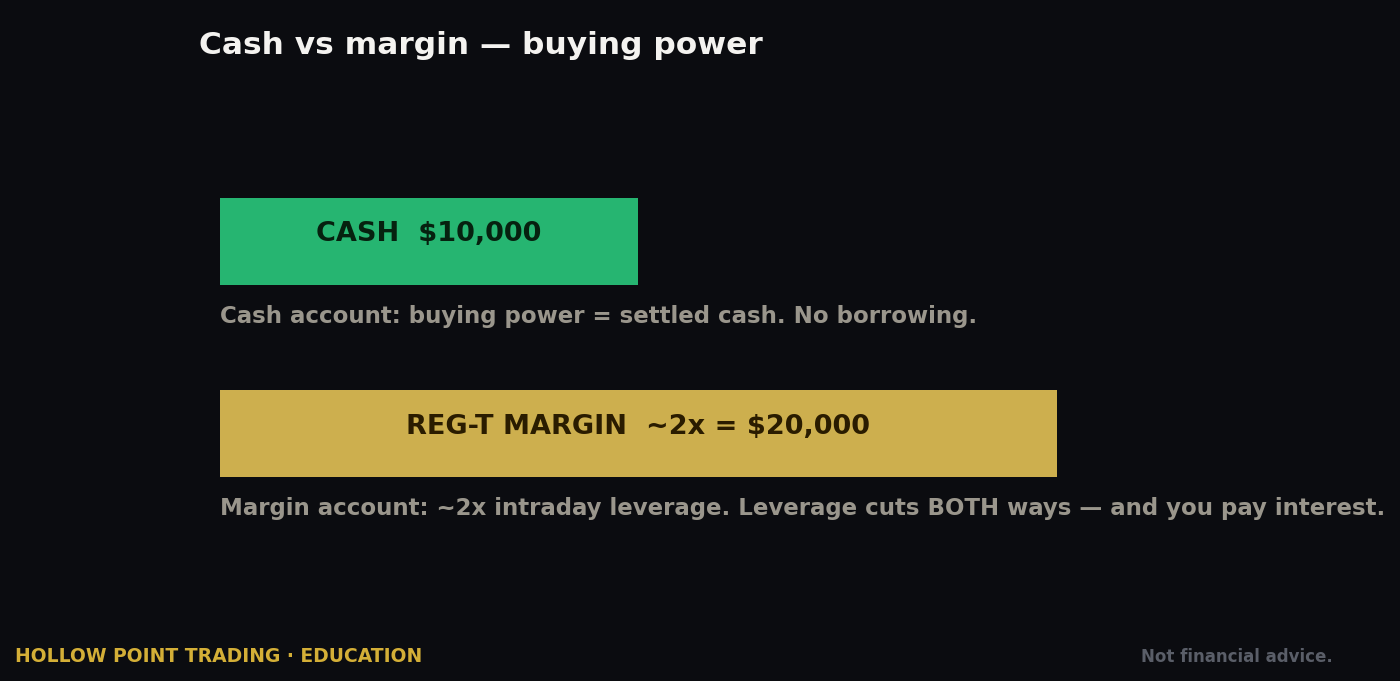
- Cash account — you trade only with settled cash, no borrowing, no margin. Simpler, safer, and — critically — never subject to the pattern-day-trader rule. Your only real constraint is settlement timing.
- Margin account (Robinhood's "Instant" or Gold-enabled margin) — lets you trade with unsettled funds and, if you opt in and qualify, borrow against your portfolio.
Beginners should generally start with a cash account. The instant-settlement convenience of a margin account is exactly the kind of friction-removal that gets new traders into trouble, and you can upgrade later with a couple of taps once you actually understand what margin does. We'll cover the real differences in the margin section.
Funding the account
- Go to the Account menu (the person icon, typically bottom-right on mobile), then Transfers → Transfer to Robinhood.
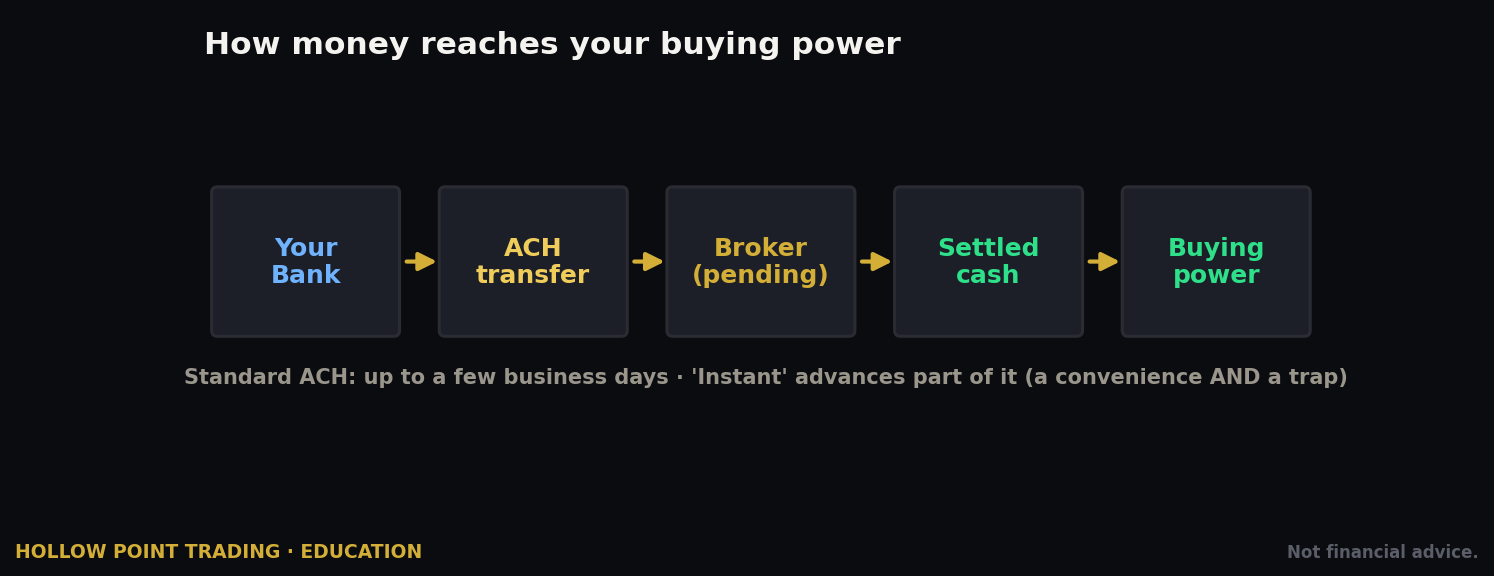
- Link your bank. The primary method is an instant electronic link through a service like Plaid — you log in to your bank through the app and the connection is made in seconds. If your bank isn't supported instantly, you can link manually using your routing and account numbers, which involves small verification deposits and takes a couple of days.
- Enter the amount and confirm. Standard ACH transfers are free.
The instant-deposit trap
Here is the first place the app's convenience quietly becomes a liability. A standard bank deposit can take up to a few business days to fully settle. But Robinhood offers Instant Deposits — up to \$1,000 of a pending deposit is made available to trade immediately (larger instant limits come with Gold). This is a convenience and a trap at the same time: you can buy stock with money that hasn't actually left your bank yet, and if that deposit is later reversed — because you fat-fingered the amount, or your bank balance was short — you're on the hook for any position you opened with it, at whatever price it's now trading.
Treat instant-available cash as real money you already have, not as a line of credit. A concrete rule: never open a position sized to money that isn't fully settled. If you deposited \$1,000 an hour ago and it shows as instant buying power, that's fine to hold as dry powder, but don't build a position you couldn't cover if the transfer bounced tomorrow.
The Interface: Mobile, Web, and Legend
Robinhood exists in three forms, and knowing which is which saves confusion — and, occasionally, money, because order types and behaviors differ subtly across them.
The mobile app
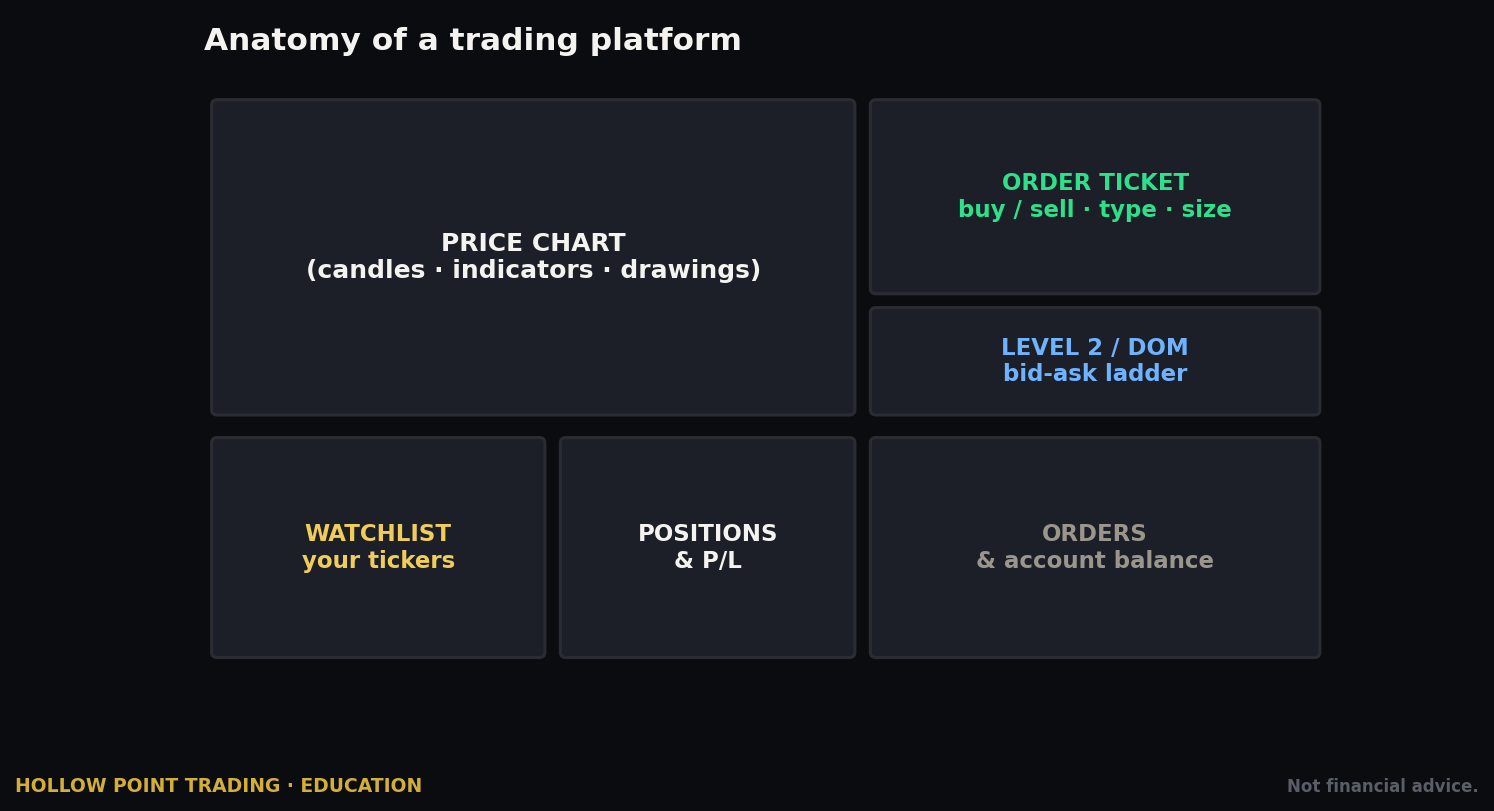
This is the flagship. The Home tab shows your portfolio value with that famous single line chart, your holdings list, buying power, and a feed of news and lists below. The Search/Browse area lets you look up any ticker. Tapping a ticker opens its detail page — price chart, buy/sell buttons, your position, stats, analyst ratings, news, and (if enabled) the options entry point. The Account menu holds transfers, settings, tax documents, and your profile. It is deliberately minimal: a handful of taps from anywhere to a trade.
That minimalism is a double-edged sword. The distance from "idle scrolling" to "live market order" is about three taps and a swipe. No serious trading platform in history has ever been this easy to fire from — and ease of firing is not a virtue when the thing you're firing is capital.
The web platform
Robinhood on the web (robinhood.com, logged in) mirrors the app with a bit more screen real estate — a persistent watchlist on the right, a larger chart, and the same order ticket. Good for research at a desk; not a serious charting environment. Think of it as the mobile app with elbow room.
Robinhood Legend
Legend is the important one for anyone reading a Hollow Point guide. It is Robinhood's free desktop platform for active traders — customizable multi-chart layouts, multiple timeframes side by side, Level II Nasdaq quotes (with Gold), multi-leg options tickets, hotkeys, and a real watchlist grid. It's a genuine step up and now competes with the likes of Webull and thinkorswim for active retail traders. If you intend to actually trade on Robinhood rather than just buy-and-hold, Legend is where you should live. Access it through the web on desktop.
Note that some order types and features differ slightly between Legend, the classic web view, and mobile, so confirm behavior on the surface you're using. A trailing stop you set on mobile should behave the same on Legend, but the interface for building a multi-leg options order is far clearer on Legend — you can see both legs and the net debit or credit in one ticket instead of squinting at a cramped phone screen.
The design lesson across all three surfaces: Robinhood removes friction everywhere. That is a feature when you're funding an account and a liability when you're one thumb-swipe from a market order you didn't think through. The app will never slow you down. You have to supply the pause yourself — and one practical way to do that is to physically separate the surfaces. Do your analysis on TradingView on one screen, place the trade on Legend on another, and keep the phone app out of reach during market hours so you're not tempted to poke at positions from the couch.
Placing Your First Stock Trade, Step by Step
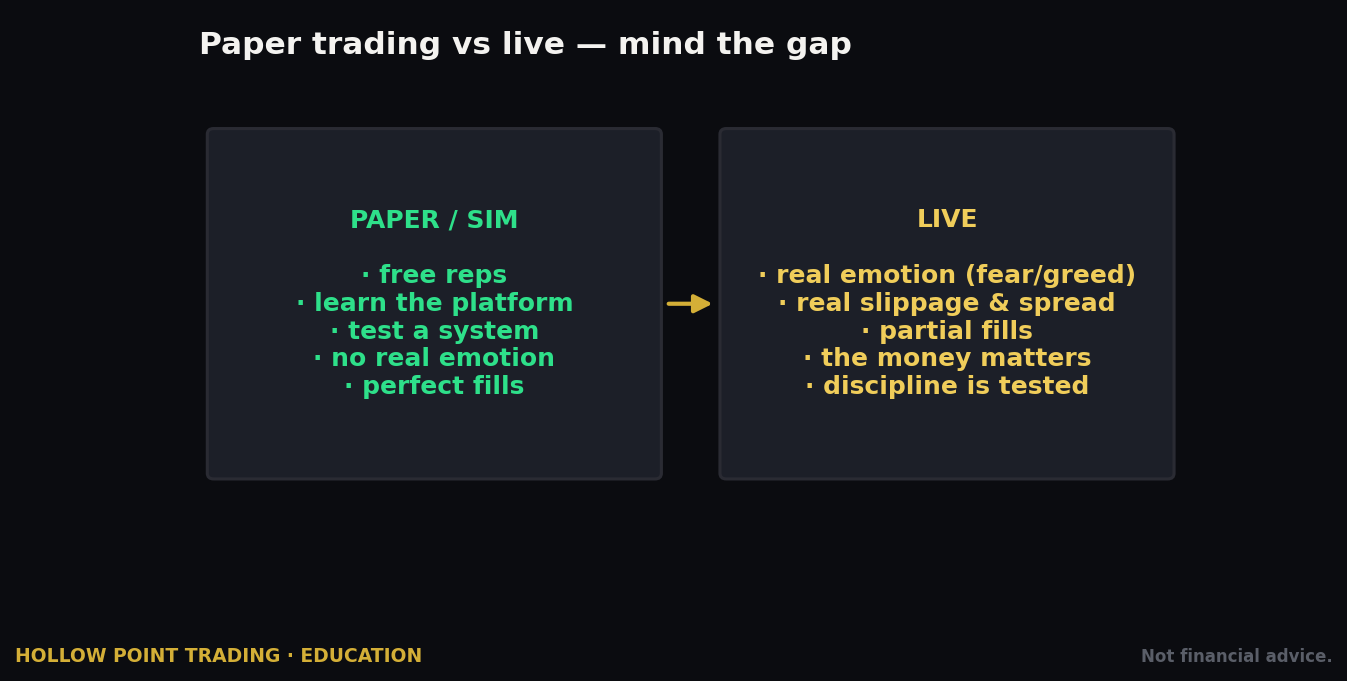
Let's buy something. We'll assume a cash account and a limit order, because market orders are a beginner's most expensive habit and we'll explain why in a moment.
- Search the ticker. Tap the search icon, type the symbol (say, an S&P 500 ETF like VOO or a single name), and open its detail page.
- Read the page first. Note the current price, the day's range, and — this is the Hollow Point way — where price sits relative to structure and trend before you commit. Robinhood's chart is thin, so do your real analysis elsewhere (this is where your TradingView work lives) and use Robinhood purely as the execution surface.
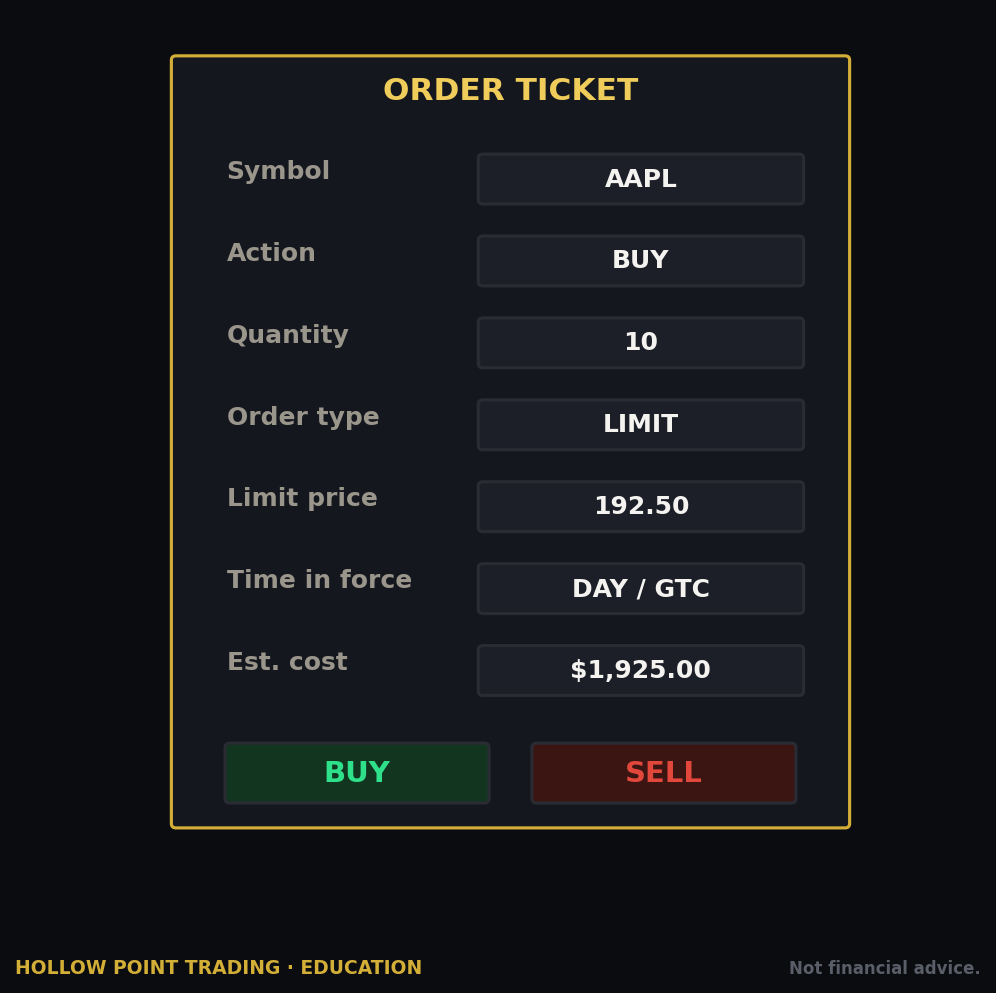
- Tap Buy. The order ticket opens.
- Choose your order type. Tap "Buy [ticker]" or the Order Type selector at the top of the ticket. Default is Market. Change it to Limit.
- Set your terms. For a limit order, enter your limit price (the most you'll pay) and the quantity — in shares or in dollars (fractional). Robinhood lets you buy in dollar amounts, which is how fractional shares work: enter "\$50" and it buys \$50 worth.
- Set time-in-force. Good-for-Day (expires at market close) or Good-till-Canceled (stays working up to a set number of days). For a beginner learning execution, Good-for-Day keeps you from forgetting a stale order that fires days later at a price your thesis no longer supports.
- Review and swipe to submit. Robinhood shows an order summary. Confirm the numbers, then swipe up to place it.
A worked example: buying a \$412 ETF two ways
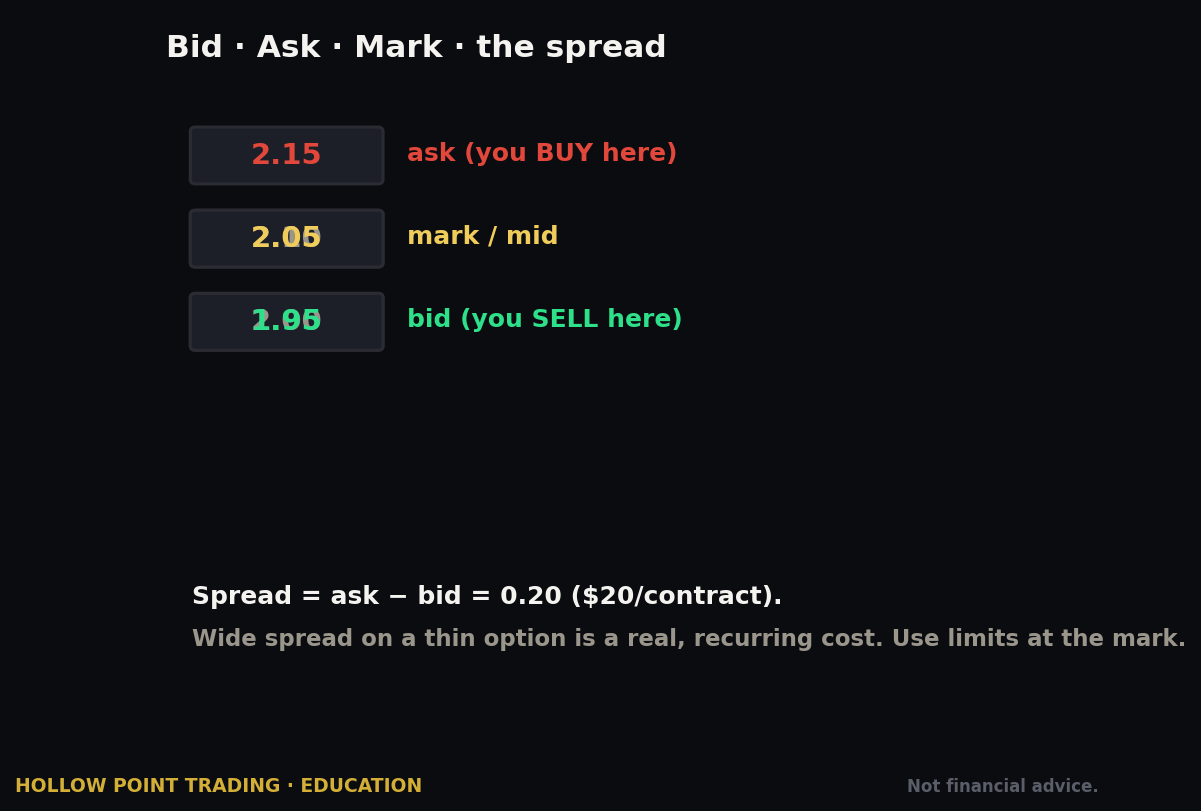
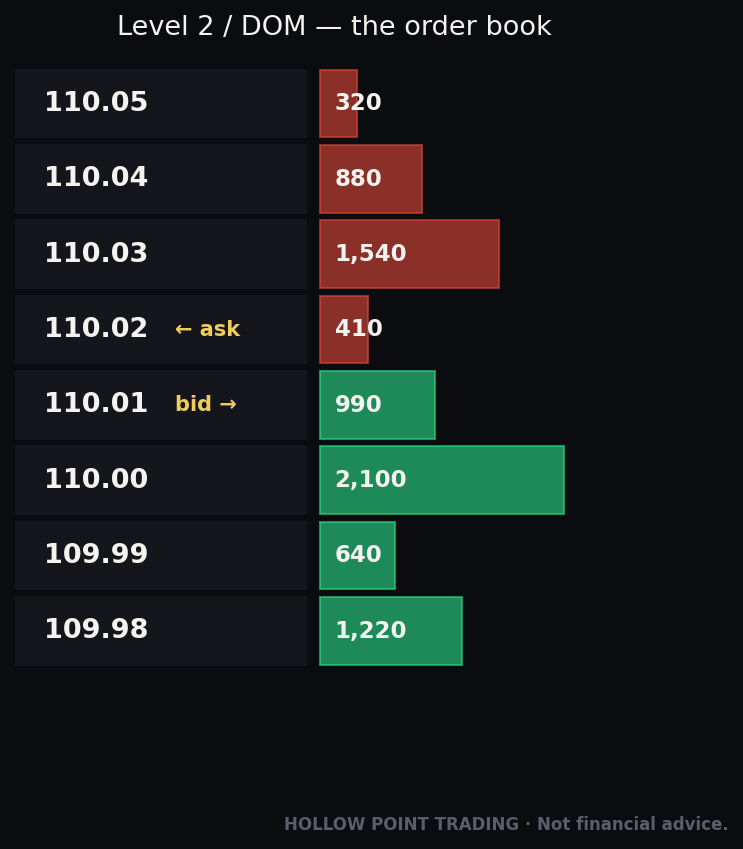
Say VOO is quoted 412.05 bid / 412.15 ask at 10:30 a.m. on a calm day. You want 10 shares.
- Market order. You tap buy at market. On a liquid ETF in liquid hours you'll likely fill right around 412.15, the ask — call it \$4,121.50 total. Fine. But run the same order at 9:30:02 on a gap-up morning, when the spread has blown out to 411.00 / 413.80 and prints are jumping, and your "market" fill could land at 413.60 — \$26 worse than the last price you glanced at, with no recourse.
- Limit order at 412.15. You cap your price. In the calm scenario you fill at 412.15 or better, identical outcome. In the volatile scenario, you either fill at 412.15 when the ask ticks back down, or you don't fill at all and you reassess — which is exactly what you want when the market is disorderly. The limit order turned a bad fill into a non-event.
Why a limit order, not a market order
A market order says "fill me right now at whatever the going price is." On a liquid ETF in the middle of the day that's usually fine. On a thin stock, at the open, or on anything volatile, a market order can fill you far from the last price you saw — and because of how Robinhood routes orders (the PFOF section explains this), you have no control over the venue. A limit order says "fill me at this price or better, or don't fill me at all." You trade the certainty of getting filled for control over the price. For a disciplined trader that's almost always the right trade. Make limit your default and force yourself to choose market deliberately.
A practical nuance most beginners miss: if you want a high probability of filling immediately while still capping risk, you don't have to lowball the limit. Set a marketable limit — a buy limit at or just above the current ask (say 412.20 when the ask is 412.15). It fills essentially like a market order in normal conditions but refuses to chase if the price suddenly runs away from you. You get the speed of a market order with a hard ceiling on the damage. This single habit prevents most of the ugly fills new traders complain about.
Selling
Selling works identically: open the position, tap Sell, choose your order type, set your price and quantity, review, swipe. In a cash account, remember that proceeds from a stock sale take a day or two to settle before you can withdraw them (though you can typically reinvest right away, since brokers extend that courtesy). We'll unpack the settlement rules in the mistakes section, because they trip up more Robinhood beginners than almost anything else.
Options: Getting Approved and Reading the Chain
Options are where Robinhood's simplicity gets genuinely dangerous, so we'll go slow. An option is a contract giving you the right (not obligation) to buy (a call) or sell (a put) 100 shares of a stock at a set strike price before a set expiration. They're leveraged, they decay in value over time, and they can go to zero. Approach them as a tool, not a lottery ticket.
Getting approved
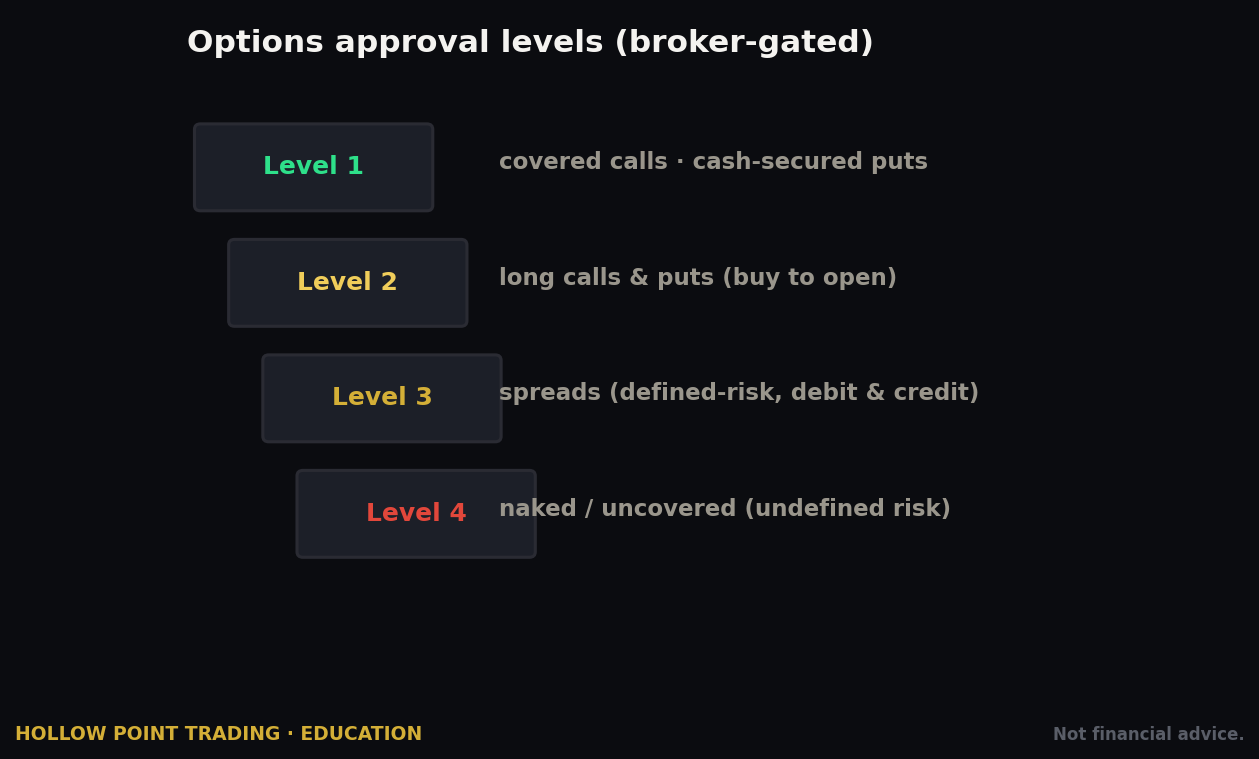
Robinhood gates options behind approval levels set by a questionnaire — your stated experience, income, net worth, and risk tolerance. The tiers, in practice:
- Level 2 — buying calls and puts, plus basic income strategies like covered calls and cash-secured puts. This is where most people start, and honestly where most people should stay for a long time.
- Level 3 — multi-leg strategies: debit and credit spreads, iron condors, calendars, butterflies. Level 3 generally requires a margin account, and Robinhood typically wants to see you've already traded Level 2 strategies. Cash accounts don't get Level 3.
To request access, go to the ticker's detail page or your account settings and look for the options enrollment flow (menu paths change — look for "Enable options trading" or an options entry in settings). You'll answer the questionnaire; approval is often immediate. Do not embellish your experience to unlock a higher level. The questionnaire exists because these products can lose more than your premium in some configurations, and the level is a guardrail, not a gate to beat. A trader who lies to reach Level 3 and then sells a naked-adjacent spread they don't understand is exactly the person the guardrail was built to protect.
Finding and reading the chain
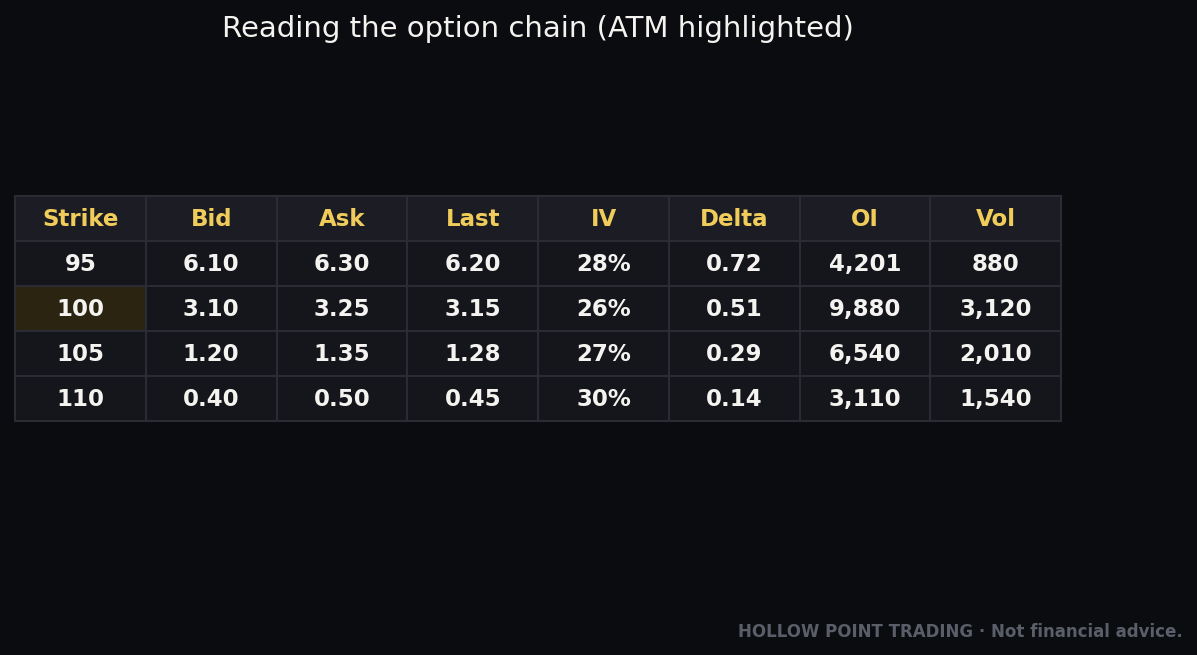
Once approved, open a ticker and tap Trade → Trade Options (wording varies). You'll see the options chain:
- Expiration dates run across the top — pick the date your thesis plays out by. Nearer expirations are cheaper but decay faster.
- Calls and puts are listed by strike price. Robinhood's mobile chain shows one side at a time with a toggle; Legend shows a fuller two-sided chain.
- For each contract you'll see the premium (price per share — multiply by 100 for the contract's dollar cost), the bid/ask, volume, open interest, and Robinhood's breakeven and percent-change figures.
- Tap a contract to open its own ticket, where you set Buy/Sell, quantity of contracts, limit price, and time-in-force — then swipe to submit, exactly like a stock.
A worked example: reading a single call
Suppose a stock trades at \$98. You believe it breaks \$105 within three weeks. You look at the chain and find a \$100 call expiring in 24 days quoted at 2.40 / 2.55, with volume of 1,800 and open interest of 12,000.
- Cost. The ask is 2.55, so one contract costs 2.55 × 100 = \$255. That's your maximum loss — the whole premium — if the stock sits still or falls.
- Breakeven. Strike + premium = 100 + 2.55 = \$102.55. The stock has to clear \$102.55 by expiration just for you to break even at expiry; below that you lose money even if the stock rose.
- Liquidity check. A 15-cent spread (2.40/2.55) on \$2.55 premium is about 6% — wide-ish but tradeable. Volume 1,800 and open interest 12,000 mean you'll be able to get out. A contract showing volume of 3 and a 40-cent spread is a roach motel: easy to enter, brutal to exit. Always check volume and open interest before you buy — thin options are where beginners get trapped holding something no one will buy back.
- The decay clock. Every day the stock doesn't move toward \$105, theta bleeds value out of that \$255. If the stock is still at \$98 in two weeks, the call might be worth \$1.10 even though you were "right that it didn't fall." Being directionally neutral is a losing position in a long option. That's the part beginners never feel coming.
The Greeks
Delta, gamma, theta, vega — the sensitivities that professionals live by — are available on Robinhood but tucked away; you often have to tap into a contract or enable them in settings. Robinhood technically gives you the data; it does not put it in front of you the way an options-first platform does. Quick translations:
- Delta ≈ how much the option moves per \$1 in the stock, and a rough proxy for probability of finishing in the money. A 0.30-delta call moves about \$0.30 per \$1 and has loosely a 30% chance of expiring in the money.
- Theta = daily decay. A theta of −0.08 means the contract loses about \$8 per day (×100), all else equal — and that accelerates into expiration.
- Vega = sensitivity to implied volatility. Buy options into an earnings report and you're paying inflated IV; the "IV crush" after the report can sink your option even if the stock moves your way.
- Gamma = how fast delta itself changes — highest near the strike and near expiration, which is why short-dated at-the-money options whip around so violently.
If you're trading options seriously, the buried Greeks are a real limitation, and Legend's chain is the better surface for it.
Multi-leg orders (spreads) require Level 3 and are best built on Legend, where you can see both legs and the net debit or credit clearly. On mobile, multi-leg tickets exist but are cramped. A vertical debit spread — buy the \$100 call, sell the \$105 call — caps both your cost and your max profit, and is often the more disciplined way to express the same view as a naked long call because it blunts theta and vega. Robinhood makes single-leg buying easiest, which nudges beginners toward the riskier structure. Name that nudge and resist it.
The Order Ticket and Every Order Type Robinhood Supports
Here is the complete order-type toolbox for stocks and ETFs on Robinhood, and — just as important — what's missing.
Supported order types
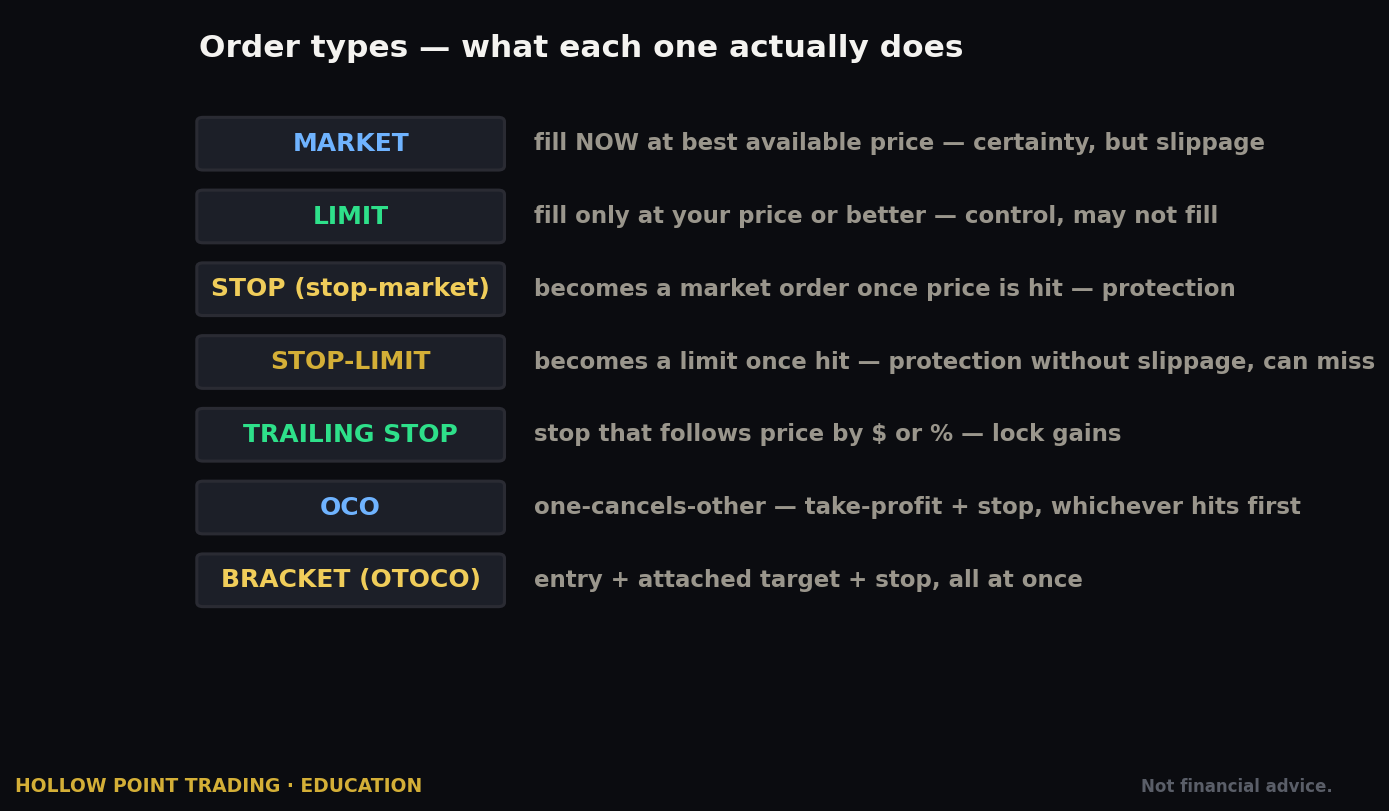
- Market order — fills immediately at the best available price. No price control. Fine for liquid names in liquid hours; risky otherwise.
- Limit order — fills only at your specified price or better. Your default.
- Stop order (stop-loss) — a resting order that becomes a market order once the stock trades at your stop price. Used to cap a loss or trigger an entry on a breakout. Caveat: because it converts to a market order, in a fast move it can fill well past your stop.
- Stop-limit order — becomes a limit order at your specified limit once the stop price is hit. You get price protection, but you risk not filling if price gaps straight through your limit. The trade-off is exactly the limit-vs-market trade-off, applied to your exit.
- Trailing stop order — a stop that automatically follows the price up (for a long) by a set amount or percentage, locking in gains while giving the trade room. When price reverses by your trail amount, it triggers. A genuinely useful risk tool, and one of Robinhood's better features.
Stop vs. stop-limit: a worked decision
You're long a stock at \$50 and want out if it breaks \$47.
- Stop (market) at \$47. If the stock drifts down to \$47 on an orderly day, you fill around \$46.95 — clean. But if bad news gaps it from \$48 to \$43 at the open, your stop triggers and fills at \$43, five points past your intended exit. You got out, which is the point of a stop, but the slippage was brutal.
- Stop-limit at \$47 stop / \$46.50 limit. Same orderly day, same clean fill. On the gap to \$43, your stop triggers but your limit says "don't sell below \$46.50" — so you don't fill, and now you're still long a stock trading at \$43 with no protection. You avoided the bad fill by keeping the bad position.
There's no free lunch here. On a hard stop meant to guarantee an exit (a hard risk line you must respect), a plain stop is usually correct despite slippage — getting out matters more than the last nickel. On an entry trigger or a soft target where not filling is fine, stop-limit shines. Choose based on which failure you can live with: a worse price, or no exit.
Trailing stops in practice
Say you buy at \$50 and set a 10% trailing stop. The trigger starts at \$45. The stock rallies to \$60 — the trail ratchets up to \$54 and never comes back down. If the stock then falls 10% off its high, it triggers around \$54, locking in roughly \$4 of gain instead of riding the whole move back to your entry. The trade-off: in a choppy market, a tight trail gets you shaken out on normal noise before the real move. Match the trail width to the stock's volatility — a 3% trail on a name that swings 5% intraday will stop you out constantly.
Time-in-force and extended hours
Time-in-force options: Good-for-Day and Good-till-Canceled (GTC, which Robinhood caps at a set number of days). Extended-hours trading is available (pre-market and after-hours sessions), with Gold or 24-Hour Market access extending the window on select names. Extended-hours liquidity is thin and spreads are wide — treat any order there with extra caution and always use limits, never market.
What's missing — and it matters
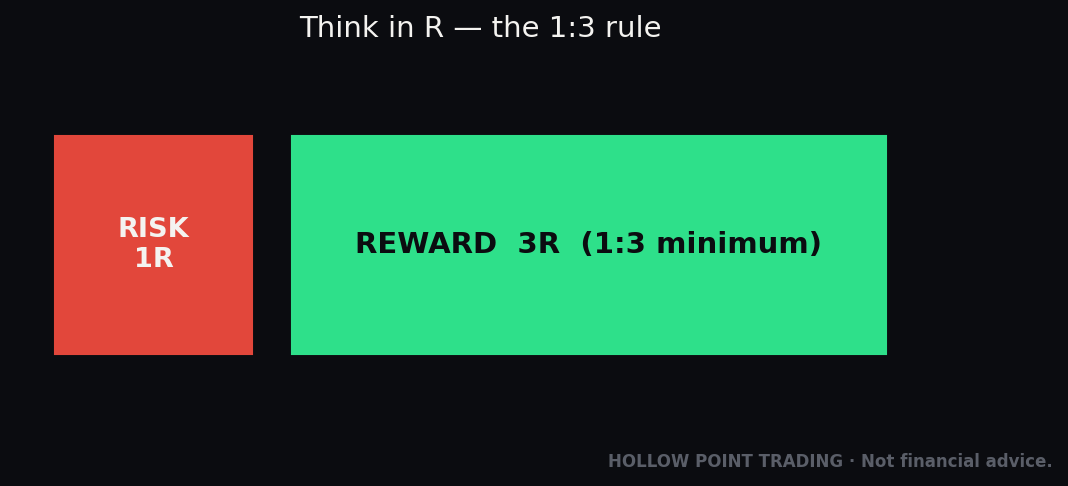
Robinhood does not offer native bracket orders (a single order that attaches a profit target and a stop-loss to your entry simultaneously) or true OCO ("one-cancels-the-other") groupings. This is the single biggest structural weakness for a disciplined trader. In the Hollow Point framework you define your stop and your 1:3 target before you enter — that's the whole discipline. On a platform with brackets, you place all three at once and walk away. On Robinhood, you have to manually place your stop and target as separate orders after you're filled, and manage them by hand.
That's more work, more room for error, and more temptation to "just watch it" instead of honoring your levels. It also creates a specific hazard: if your manual stop and your manual target are two independent orders and the target fills, your stop is still live — you now have a resting sell order against shares you no longer own, and if it triggers you've accidentally gone short (or the order rejects, depending on account type). You have to cancel the other leg by hand the moment one fills. A real OCO does this automatically; on Robinhood, you are the OCO engine. Build the habit: fill, place stop, and the instant either your stop or your target executes, kill the survivor.
Fees, Commissions, and the PFOF Reality
The commission story is genuinely good. Stock and ETF trades: \$0 commission, no per-trade fee. Equity options: \$0 commission and \$0 per-contract fee — this is Robinhood's real differentiator, since many brokers charge \$0.50–\$0.65 per contract. For an active options trader that's a meaningful saving. Trade ten contracts a day, 200 days a year, and at \$0.65 a contract elsewhere you'd have paid \$1,300 in fees. On Robinhood that line is \$0.
The nuances, which you should verify against Robinhood's current published fee schedule because these numbers change:
- Index options are the exception — they carry a per-contract fee (around \$0.50 standard, \$0.35 with Gold) plus exchange pass-through fees. If you trade SPX instead of SPY, that fee reappears.
- Regulatory pass-through fees still apply on sell orders industry-wide: a small SEC fee and a FINRA Trading Activity Fee (fractions of a cent per share on equities, a few tenths of a cent per contract on options). On options, Robinhood also passes through a small combined OCC/exchange regulatory fee (on the order of a few cents per contract). These are tiny and unavoidable at any broker, but they exist and they're why your sell proceeds are a few pennies short of the round number.
- Other fees: broker-assisted phone trades, outgoing wire transfers, and a full account transfer out (ACAT) fee if you move your account to another broker all carry charges. Robinhood is cheap to use and not free to leave — the ACAT-out fee is the toll on the exit ramp.
Payment for order flow — how Robinhood actually makes money
Now, the part that explains everything else. When you place an order, Robinhood doesn't send it straight to a public exchange. It routes it to a wholesale market maker (firms like Citadel Securities and others), and those firms pay Robinhood for the right to fill your order. That's PFOF — payment for order flow. It's Robinhood's single largest trading-revenue source, generating hundreds of millions of dollars a year, dominated by options flow.
Is PFOF evil? Not exactly — it's how commission-free trading is funded across much of the industry, and market makers are required to give you a fill at or better than the best public bid/ask (the "NBBO"). But the incentives deserve your clear eyes:
- Your "free" trade is monetized through where your order goes, not through a commission line item. You're not the customer so much as the product — your order flow is the thing being sold. Someone is paying for your trades; it just isn't you, and it isn't out of charity.
- Execution quality is real but invisible. You might get a fraction of a cent of "price improvement," or you might not get the best possible fill a smarter routing choice would have found — and you can't choose the venue. For most small orders the difference is pennies. For a high-volume trader it compounds into real money over a year.
- PFOF pays more on options than on stocks, which is part of why the app makes options so easy to reach. The design that puts options two taps away is not an accident; it routes toward the flow that pays Robinhood the most. That's not a conspiracy — it's just an incentive you should name out loud, because once you see it you stop mistaking "the app made this easy" for "this is a good idea."
Robinhood has also drawn regulatory scrutiny and paid settlements over aspects of its business and disclosures over the years, including its historical handling of PFOF disclosures and the 2021 trading restrictions during the meme-stock episode. None of that means you can't use it well. It means you should use it knowingly — understanding that the frictionless, gamified, options-forward design serves Robinhood's revenue model, and your discipline is the only counterweight.
Margin, Account Types, and Day-Trading Rules
Robinhood Gold
Gold is the \$5/month (or \$50/year) subscription that unlocks the platform's premium tier. For that you get: a higher APY on uninvested cash through the cash sweep program, larger instant deposits, Level II market data, Morningstar research, discounted (and a slice of interest-free) margin, and an IRA match. Whether it's worth it is simple math — if you keep meaningful cash earning the higher APY, or you use margin, it can pay for itself; if you don't, it's \$60 a year for features you won't touch.
A quick way to decide: if you're parking, say, \$10,000 in cash and Gold's sweep pays even one percentage point more than the base rate, that's \$100 a year on that cash alone — Gold pays for itself and then some. If you keep \$300 in cash and never use margin or Level II, you're buying features you won't touch. Verify the current APY and margin terms before subscribing, as Robinhood adjusts both with rates.
Margin
Margin — borrowing against your portfolio to trade with more than you deposited — is available to margin-account holders, with Gold providing better rates and a small interest-free buffer above which standard tiered interest applies. Understand what margin is before you enable it: it's a loan, it magnifies losses as much as gains, and a margin call can force-sell your positions at the worst possible time, at prices you don't choose, to protect the broker's loan and not your account.
A blunt illustration: put in \$5,000, borrow another \$5,000, buy \$10,000 of stock. A 20% drop takes the position to \$8,000 — but the \$5,000 loan doesn't shrink, so your equity is now \$3,000, a 40% loss on your own money from a 20% move. Push a little further and the broker liquidates you into the hole. For most people reading their first broker guide, the correct amount of margin is zero. It is a tool for a specific, sized, risk-managed purpose — not free extra buying power to be spent because it's there.
Account types available
Individual taxable brokerage (cash or margin), traditional and Roth IRAs (with the Robinhood match, a genuine differentiator — effectively free money on retirement contributions that legacy brokers don't offer), and the spending/cash-management account. Robinhood does not offer the full range of account types a legacy broker does (no joint taxable, limited entity/trust options historically) — check current availability if you need something beyond an individual account or IRA.
The pattern day trader rule — and a major 2026 change
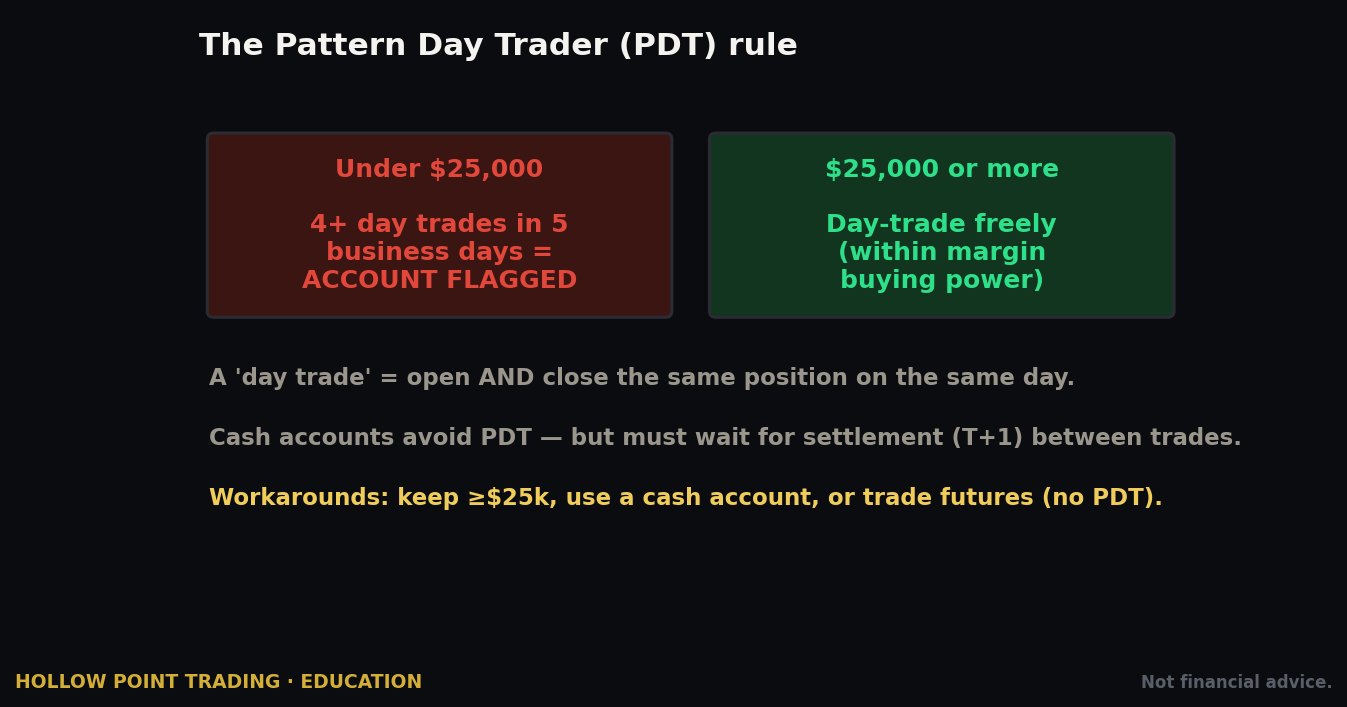
Historically, if you made four or more day trades in five business days in a margin account, you were flagged a "pattern day trader" (PDT) and had to keep at least \$25,000 in equity to keep day trading. Fall below it and you got locked out of day trades. This tripped up countless Robinhood beginners who didn't even know they were "day trading" — buy and sell the same stock the same day just three or four times in a week and the app flags you.
That framework is changing. In 2026 the SEC approved FINRA's move to eliminate the \$25,000 minimum and the PDT designation itself, replacing it with a real-time intraday-margin approach — with an implementation window stretching into 2027 while brokers roll it out. What this means for you practically: the old \$25k rule may or may not still be enforced on your account depending on where Robinhood is in its rollout, so verify the current day-trading rules inside the app before you rely on them. And note the durable point that survives any rule change: in a cash account you were never subject to PDT at all — you can day-trade as often as your settled cash allows, the constraint being settlement, not a trade count.
How the Same Tool Behaves in Different Market Regimes
Robinhood's order types don't change, but the market they land in does — and the right choice in a calm trend is the wrong one in a violent one. This is the part beginners never get taught, because the app presents every day as the same clean line chart.
Quiet trend
In a low-volatility uptrend, spreads are tight and fills are boring — in the best way. Marketable limits fill instantly near the last price. Trailing stops can be set relatively tight because the stock isn't whipping. A stop-loss (market) behaves almost identically to a stop-limit because there's no gap risk to speak of. This is the regime the app's simplicity was implicitly designed for, and where a beginner is least likely to get hurt by it.
Chop / range
In a sideways, choppy tape, the enemy is getting sawed in half — stopped out at the bottom of the range, then again at the top. Tight stops get picked off by noise. Here you widen your stop and shrink your size to keep the dollar risk constant, rather than keeping size fixed and tightening the stop into the chop. Trailing stops are treacherous in chop; a fixed stop below the range low is usually cleaner. And a lot of the best trades in chop are no trade — Robinhood's frictionless design makes doing nothing feel like a missed opportunity, when in a range it's the edge.
High volatility / news
On a high-vol day — a CPI print, an earnings gap, a market-wide risk-off — spreads blow out, market orders become russian roulette, and stops gap. Never use a market order here. Use limits for entries, accept that some won't fill, and understand that a stop-loss may slip far past your level. Size down hard. This is precisely when the app is most dangerous, because volatility is exciting and the trade is two taps away. The professional trades smaller when it's loud; the beginner trades bigger.
Multi-Timeframe Discipline on a Single-Chart App
Robinhood's chart is not built for multi-timeframe work — which is exactly why your analysis belongs elsewhere. The Hollow Point way is top-down: establish trend and key levels on the higher timeframe, then drop down to execute. On Robinhood that means a clean division of labor.
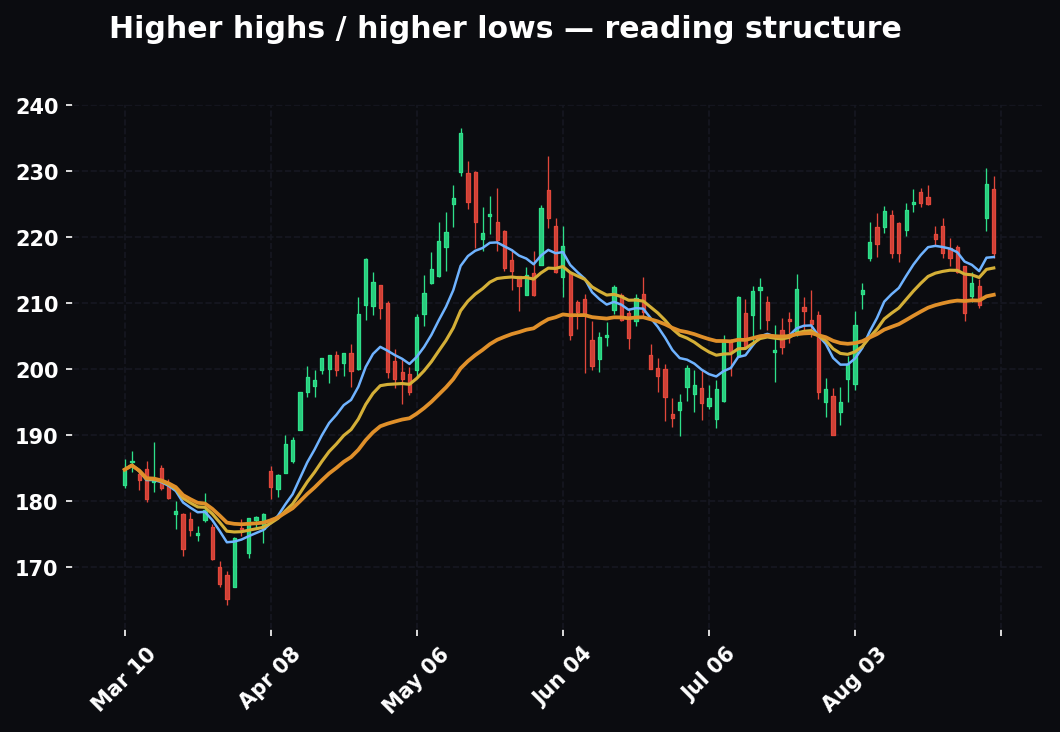
Do your higher-timeframe read on TradingView — the daily and 4-hour to define trend, the levels that matter, the structure (higher highs and higher lows, or the opposite). Note the exact prices: the level you'd enter at, the level that invalidates the idea, the target. Then switch to Robinhood (ideally Legend) purely to place the orders at those pre-decided prices. The app's thin chart is not a temptation if you never use it to make decisions — you're only using it to key in numbers you already committed to.
The trap Robinhood sets is the opposite of multi-timeframe discipline: it hands you a single, hypnotic line and invites you to react to the last tick. Every time you find yourself making a decision from Robinhood's chart, you've collapsed your timeframes down to one — the shortest, noisiest one — and abandoned the top-down structure that was your actual edge.
Building Confluence: Robinhood Plus the Rest of Your Stack
Robinhood is one tool in a chain, not the whole workflow. Three combinations turn it from a gamified toy into a professional execution surface.
Robinhood + TradingView (analysis + execution)
This is the core pairing and it's non-negotiable for a serious trader. TradingView is where you draw levels, run indicators, mark structure, and build the plan. Robinhood is where you press the button. The rule: no decision originates on Robinhood. If a level isn't on your TradingView chart, you don't trade it. This keeps the app in its lane — a fast, free order pipe — and keeps your judgment on a real charting platform.
Robinhood + a written trade plan (the bracket you don't have)
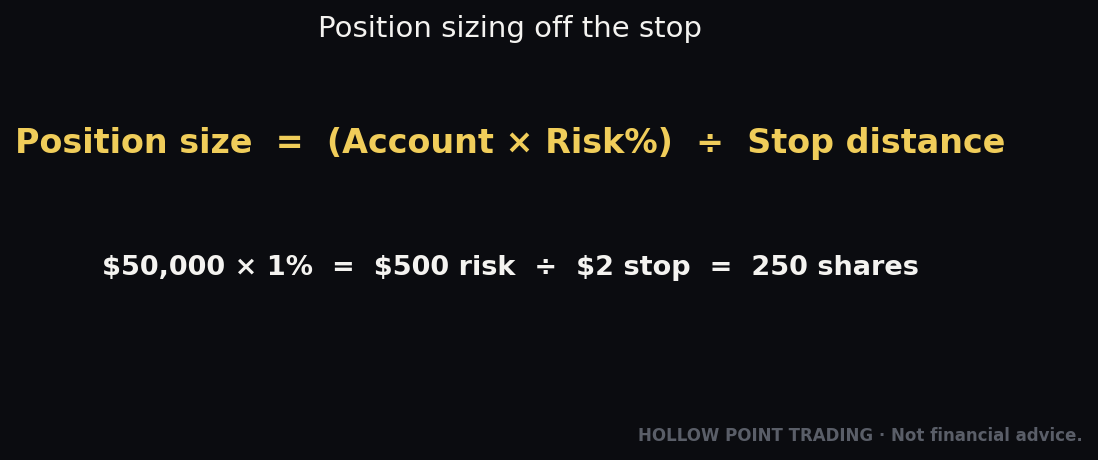
Because Robinhood lacks native brackets, your written plan becomes the bracket. Before entry, write down three numbers: entry, stop, target — sized so the stop is your defined risk and the target is at least 1:3. The moment the entry fills, you place the stop as your first action, then the limit target. The paper (or notes-app) plan is the atomic order the platform won't give you. Traders who skip this because "I'll just watch it" are the ones who turn a defined \$100 risk into a \$400 loss.
Robinhood + options-flow / GEX context
If you use options-positioning data — gamma walls, put/call walls, a gamma flip level — that context tells you where price is likely to pin or get magnetized, and it sharpens your strike and expiration selection on Robinhood's chain. Robinhood won't show you this; it comes from your own tooling. Pick the strike that sits with the flow, not against a wall, and use Robinhood only to execute the contract you already chose. Never invent a level to justify a trade — if the data isn't in front of you, trade the price structure and leave the flow read out of it.
How the Pros Use Robinhood Differently From Beginners
The same app, in two sets of hands, is two different tools. The differences aren't about secret features — they're about posture.
- The beginner reacts to the app; the pro drives it. A beginner opens Robinhood and looks for something to do. A pro arrives with a plan already written and uses the app only to execute it. The app never generates the pro's decisions.
- Limit is the pro's reflex; market is the beginner's. The pro has made marketable limits automatic and treats a plain market order as a rare, deliberate choice. The beginner swipes the default.
- The pro places the stop before celebrating the fill. For the beginner, the fill is the finish line. For the pro, the fill is the start of risk management — stop first, always, because the platform won't do it for them.
- The pro sizes to a fixed dollar risk; the beginner sizes to buying power. A pro decides "I'll risk \$150 on this" and lets the stop distance dictate share count. A beginner asks "how many shares can I afford?" — which is sizing to greed, not to risk.
- The pro reads PFOF and gamification as incentives to resist; the beginner experiences them as helpful nudges. Knowing the app is engineered for engagement, the pro deliberately adds friction — a checklist, a cooldown, a plan — where Robinhood removed it.
- The pro ignores the dopamine line; the beginner refreshes it. That green portfolio curve is designed to be checked. The pro's attention is on levels and structure elsewhere; the app's home screen is just a balance, not a feed to be consumed.
- The pro treats options as defined-risk structures; the beginner treats them as cheap lottery tickets. Same chain, opposite intent — spreads and sized single legs with an exit plan versus a coin-flip on a Friday expiration because it "only cost \$40."
Strengths and Weaknesses vs. the Field
Where Robinhood genuinely wins
- Onboarding and simplicity. Nothing gets a beginner from download to first trade faster.
- Fractional shares on a huge universe of stocks and ETFs, down to dollar amounts — excellent for small, diversified, dollar-cost-averaging investors.
- \$0 equity-options contract fees — a real edge for active options traders versus per-contract brokers.
- Clean cash management with a competitive sweep APY (with Gold) and FDIC coverage through partner banks.
- IRA match — free money on retirement contributions that legacy brokers don't offer.
- Legend — a legitimately good, free active-trader desktop platform that closes much of the old "toy app" gap.
Where it falls short for a serious trader
- No native bracket/OCO orders. The biggest one for risk-managed trading. You cannot set entry, stop, and target as one atomic order.
- Thin charting and research in the core app. Your analysis has to happen elsewhere (TradingView), with Robinhood used only for execution. Legend narrows this gap but doesn't fully close it.
- Customer service has historically been the weak point — improving, with 24/7 chat and phone support now, but not the deep bench a legacy broker offers when something goes wrong with real money.
- Tax and reporting tools are basic compared to the incumbents.
- PFOF-based routing means you don't control execution venue, which matters at size.
- The design fights your discipline. Peers like Fidelity and Schwab are built around long-term investing; Robinhood is built around engagement. That's a philosophical difference you feel in every notification.
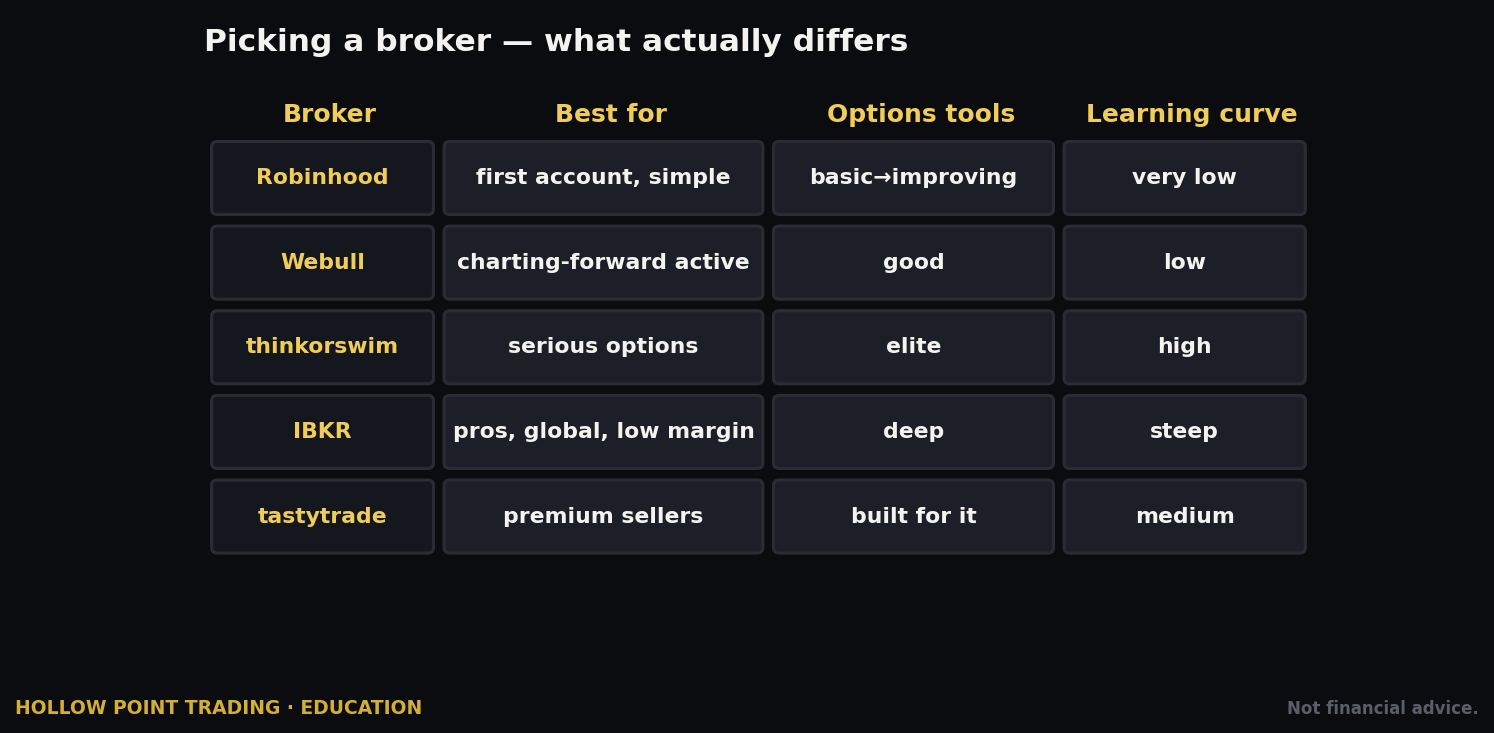
Versus Fidelity/Schwab: they beat Robinhood on research, service, account breadth, and trust; Robinhood beats them on simplicity, options pricing, and app polish. Versus Webull/Moomoo: comparable active-trader ambitions, with the field differentiating on charting depth and specific fee schedules. Versus a true options platform (tastytrade, thinkorswim): those win decisively on options tooling, analytics, and order flexibility; Robinhood wins on approachability and contract cost.
Common Mistakes on Robinhood Specifically
These aren't generic — they're the mistakes this app's design actively encourages, and each one traces directly back to a piece of friction Robinhood removed.
- Defaulting to market orders. The ticket opens on Market and the swipe-to-buy is one motion. Change it to Limit, every time, until it's muscle memory. The default was chosen for speed, not for your fill quality.
- Trading with instant-deposit money you don't have yet. That \$1,000 of instant buying power is a pending transfer, not cash in hand. Don't spend it as if the deposit already cleared, and never size a position to money that isn't settled.
- Reaching for options because they're right there. Two taps from any stock, gamified, with PFOF quietly incentivizing the routing. Options are a leveraged tool with a decay clock, not a cheaper way to bet on a stock. Get them only when you understand the Greeks and can define your risk.
- Ignoring settlement in a cash account. In a cash account, proceeds from a sale aren't settled for a day or two. Buy stock B with the unsettled proceeds of stock A, then sell stock B before A settles, and you've committed a good-faith violation — rack up a few and Robinhood restricts you to settled-cash-only for months. Know what you can reinvest versus withdraw, and don't churn unsettled funds.
- Not placing a stop the instant you're filled. Because there are no brackets, nothing places your stop for you. If you don't do it manually and immediately, you're trading naked. Build the habit: fill, then stop, before you do anything else.
- Confusing a stop order with guaranteed protection. A stop becomes a market order and can fill far below your stop in a gap. Know the difference between stop and stop-limit and choose deliberately based on which failure you can tolerate.
- Forgetting to cancel the other leg of a manual bracket. When your target fills, your stop is still live against shares you no longer own — and vice versa. You are the OCO engine; cancel the survivor the instant one side executes.
- Treating the portfolio line chart as analysis. That satisfying green line is a dopamine driver, not a signal. Your read lives on real charts and real levels, not on Robinhood's home screen.
- Over-trading because it's frictionless and free. Zero commission removes the natural brake that used to make people think twice. The cost of a bad trade isn't the commission — it's the loss. Free execution doesn't make a low-quality setup worth taking.
- Chasing the app's notifications and lists. "Top movers," "most popular," push alerts on names you don't own — these are engagement hooks, not trade ideas. A stock being on a Robinhood list is not a reason to buy it; it's a reason someone at Robinhood wants you to open the app.
- Buying illiquid options with no exit. A contract with volume of 4 and a 40-cent spread is easy to enter and a trap to exit. Always check volume and open interest; thin options can't be sold when you need out.
- Lying on the options questionnaire to unlock a higher level. The level is a guardrail sized to what you can survive. Beating it just removes the one thing standing between you and a strategy you don't yet understand.
The pattern under all twelve: Robinhood removes friction, and friction was quietly protecting beginners from themselves. The professional's job is to reintroduce friction on purpose — a written plan, defined risk, a limit order, an immediate stop, a reason to pass. The app will never slow you down. You must.
Frequently Asked Questions
Is Robinhood safe? Can I lose the money in my account to a Robinhood failure? Your securities are held with SIPC protection (up to standard limits), and cash in the sweep program is held at partner banks with FDIC coverage. That protects against the broker failing — it does not protect against your trades losing money. The market risk is entirely yours.
Is "free" really free? There's no commission, but you pay indirectly through payment for order flow — market makers pay Robinhood to fill your orders, and you may give up small amounts of price improvement you can't see. For small investors this is negligible; for high-volume traders it adds up. Free means "no line-item fee," not "no cost."
Should I use a cash account or a margin account? Start with cash unless you have a specific, understood reason for margin. Cash accounts avoid the pattern-day-trader rule entirely and remove the temptation of borrowed buying power. The only cost is settlement timing, which good planning handles.
Do I need Robinhood Gold? Only if you'll use it. If you park meaningful cash (the higher sweep APY pays for it) or use margin (better rates), the \$60/year can pay for itself. If you keep little cash and don't use margin or Level II data, skip it.
Can I day trade on Robinhood? Yes, subject to the day-trading rules in effect on your account. The old \$25k pattern-day-trader minimum is being phased out under a 2026 FINRA/SEC change, but rollouts vary — verify the current rule in-app. Cash accounts have never been subject to PDT; they're limited by settlement instead.
Why did my market order fill at a worse price than I saw? Between the price you glanced at and the moment your order reached a market maker, the price moved — especially at the open, on thin names, or in high volatility. A market order accepts whatever the going price is. Use limit orders to cap this.
Where are the Greeks? They exist but are buried — tap into a contract or enable them in settings, and use Legend's chain for a fuller view. Robinhood technically provides the data without putting it front and center, which is a real limitation for serious options trading.
Can I move my account to another broker later? Yes, via an ACAT transfer — but Robinhood charges a transfer-out fee. It's cheap to use and not free to leave. Factor that in before you consolidate accounts elsewhere.
What's the single most important habit on this platform? Place your stop the instant you're filled. Because there are no native brackets, nothing does it for you, and an unprotected position is the most expensive mistake the app's design invites.
Quick-Start Cheat-Sheet
Setup: Download app → sign up → complete SSN + identity + investment-profile questions honestly → turn on 2FA → get approved → link bank via instant connection → start with a cash account.
Fund: Account → Transfers → Transfer to Robinhood → amount → confirm. Standard ACH is free; treat instant-available cash as real money, not credit — never size a position to unsettled funds.
First trade: Search ticker → do your real analysis on TradingView first → tap Buy → change order type to Limit → set price + quantity (dollars or shares) → Good-for-Day → review → swipe. Use a marketable limit (at/just past the ask) when you want speed with a price ceiling.
Order types: Market (no price control), Limit (your default), Stop (becomes market at trigger — can slip in a gap), Stop-Limit (price protection, may not fill), Trailing Stop (follows price, locks gains — widen it in choppy names). No brackets or OCO — place your stop manually the instant you're filled, and cancel the surviving leg when either side executes.
Regime rules: Quiet trend → limits fill easy, tight stops OK. Chop → widen stops, shrink size, or don't trade. High-vol/news → limits only, never market, size down hard.
Options: Get Level 2 for buy calls/puts; Level 3 (needs margin account) for spreads. Chain: pick expiration → pick strike → read premium × 100 = cost → compute breakeven (strike + premium for a call) → check bid/ask, volume, open interest → tap contract → limit order → swipe. Find the Greeks (delta ≈ move + rough probability; theta = daily decay; vega = IV risk) before you trade; use Legend for spreads. Don't buy illiquid contracts you can't exit.
Fees: \$0 stock/ETF/equity-options commissions and \$0 equity-options per-contract fee; index options and tiny regulatory sell-side fees are the exceptions — verify the current fee schedule. You pay indirectly through PFOF.
Gold (\$5/mo): higher cash APY, Level II, research, IRA match, better margin. Worth it only if you'll actually use it.
Day trading: The old \$25k PDT rule is being phased out under a 2026 FINRA/SEC change — verify current rules in-app. Cash accounts are limited by settlement, not trade count.
Stack: TradingView (analysis) → written plan with entry/stop/target at 1:3 (your manual bracket) → Robinhood/Legend (execution only). No decision originates on Robinhood.
The one rule that survives every UI update: Robinhood is an execution surface, not a trading system. Your edge is the plan, the defined risk, the 1:3, the limit order, and the stop you place yourself. The app supplies convenience. You supply discipline.
Verify current fees, approval levels, APYs, and day-trading rules directly in the app or on Robinhood's published disclosures before acting — this platform changes its screens and terms frequently.
Bound by rules, feared by trade.